Backend Systems
Backend defines where and how a quantum circuit is executed. In Qniverse, a backend acts as a logical execution container that binds together the following components, in order:
Processor – The type of hardware or execution target.
HPC – The compute cluster or execution environment.
Simulator – The execution engine responsible for running the quantum circuit.
Creating Backend
A backend object is the starting point for execution. However, it does not perform any computation until it is fully configured.
from Qniverse.backend import Backend

token = "your_token" # must be in global scope
backend = Backend()
At initialization:
No processor is selected.
No HPC environment is attached.
No simulator is defined.
Attempting to execute a circuit at this stage will raise a configuration error. This enforces explicit and deterministic backend setup.
- Configuration must be performed in the following order:
Processor→HPC Environment→Simulator
Note
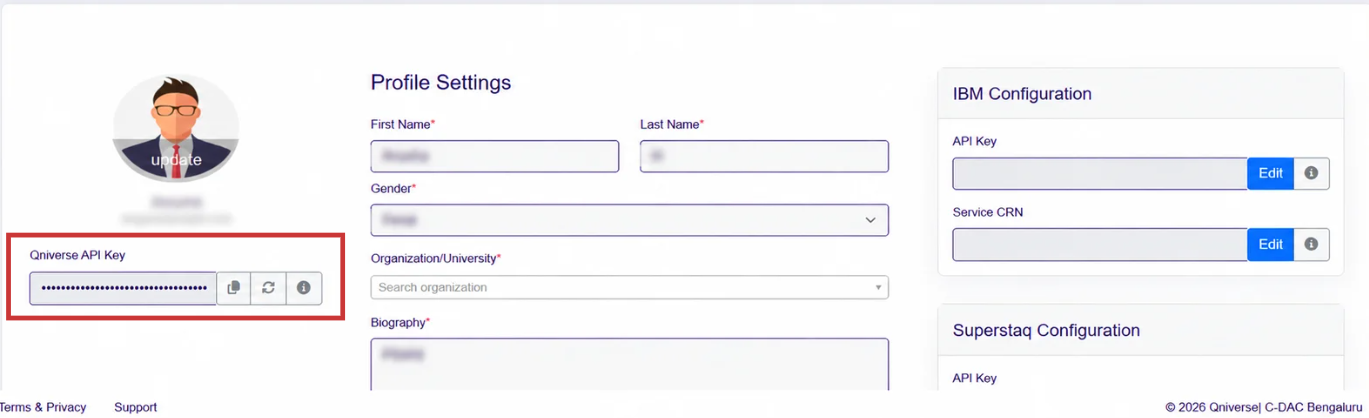
To obtain the token,
Visit the Qniverse platform at qniverse.in and complete the registration process. After logging in, go to the user profile dashboard and copy the Qniverse API Key. Store the token securely. If the token is lost or compromised, you can generate a new one by clicking the refresh icon.
Warning
Setting the configuration out of order raises a ValueError.
The token variable must be defined at the global scope of your script before Backend() is called. If token is missing, a RuntimeError is raised immediately.
Function : backend.processor(name)
Description : Sets the execution hardware type for the backend. Must be called before hpc() and simulator().
Syntax:
backend.processor(name)
Parameters :
name* (str) : The processor type. Accepted values can be listed by using the utility function
Backend.get_processor().
Function : backend.hpc(name)
Description : Sets the HPC cluster environmet. Requires processor() to be set first.
Syntax:
backend.hpc(name)
Parameters :
name* (str) : HPC cluster name. Accepted values can be listed by using the utility function
Backend.get_hpc(processor).
Function : backend.simulator(name)
Description : Sets the quantum simulator engine. Requires both processor() and hpc() to be configured first. The simulator must be compatible with the selected processor and HPC combination.
Syntax:
backend.simulator(name)
Parameters :
name* (str) : HPC cluster name. Accepted values can be listed by using the utility function
Backend.get_simulator(processor,hpc)
Example Configuration of Backend
token = "your_token"

backend = Backend()
backend.processor("CPU")
backend.hpc("QACC_Cluster")
backend.simulator("qasm_simulator")
Listing Supported Backend Resources
The QSDK provides utility methods to inspect the backend resources currently supported. These methods allow users to query available processors, HPC environments, and simulators.
Backend.get_processor()
Returns the list of processor types supported by the QSDK i.e., CPU, GPU.
Processors define the execution device category on which quantum circuits can run, such as CPU-based execution or other supported execution targets.
Backend.get_hpc(processor)
# example : Backend.get_hpc("CPU")
Returns the list of HPC environments supported by the QSDK for the specified processor.
Currently supported HPC environments include:
QACC_Cluster
Param_Utkarsh
Both CPU and GPU processors support these environments (subject to simulator availability).
Backend.get_simulator(processor, hpc)
# example : Backend.get_simulator("CPU", "QACC_Cluster")
Returns the list of simulators supported by the QSDK for the given processor and HPC environment.
Simulators define the execution model used to run the quantum circuit (e.g., QASM-based simulation, statevector simulation, density matrix simulation).
The simulators available in Qniverse depend on the selected Processor and HPC environment.
Processor: CPU and HPC : QACC_Cluster
Supported simulators:
aer_simulator_density_matrix
aer_simulator_statevector
cirq_simulator
qasm_simulator
qsimcirq_simulator
quest_simulator
qulacs_multicpu_simulator
Processor: GPU and HPC : QACC_Cluster
Supported simulators:
aer_simulator_statevector_gpu
nvidia_cudaq_statevector_simulator
qsimcirq_cuquantum_gpu_simulator
Processor: GPU and HPC : Param_Utkarsh
Supported simulators:
aer_simulator_statevector_gpu
Processor: CPU and HPC : Param_Utkarsh
Supported simulators:
aer_simulator_density_matrix
aer_simulator_statevector
cirq_simulator
qasm_simulator
The below example shows a complete user flow combining initialization, gate application, measurement, drawing, and QASM Transpilation and executing
from Qniverse.gates import *
from Qniverse.QniverseCircuit import *
from Qniverse.backend import *
from Qniverse.transpile import *
from Qniverse.api import *
from Qniverse.module import *
import numpy as np

qc = QniverseCircuit()

def example(qc,q1,q2):
   qc.add_gate(y, q1)
   qc.add_gate(s, q2)


q  = QuantumRegister(5, 'q')
c  = ClassicalRegister(3, 'c')

qc.add_register(q)
qc.add_register(c)

example(qc,q[1],q[2])

qc.add_gate(h, q[1])

qc.add_gate(measure, q[1], k[1])
qc.add_gate(p(np.pi/2), q[1])
qc.add_gate(u2(np.pi/2,0,0),q[2])


qc.initialize(
     "q[2]",
     alpha=complex(np.sqrt(0.5), 0),
     beta=complex(0, np.sqrt(0.5))
)

qc.measure_all()


qc.draw("circuitnew.svg")
qc.qasm()

token = "your_token"

backend = Backend()

backend.processor("GPU")
backend.hpc("QACC_Cluster")
backend.simulator("qasm_simulator")

job = run(qc,backend,shots,
            token=token,
            job_name="testjob"
            )

print("job_result=",fetch_job_result(token,job))